

In a business environment where companies seek greater agility, efficiency, and compliance, process mapping – or Business Process Mapping (BPM) – has become a cornerstone of organizational transformation.
Often associated with BPMN modeling (Business Process Model and Notation), it allows organizations to represent their actual operations in a clear and standardized way.
Far from being a theoretical exercise, process mapping provides a shared view of “who does what, when, and with what.”
It helps identify redundancies, critical dependencies, and opportunities for optimization.
Let’s start by understanding what it entails before exploring how to approach it effectively
What is Process Mapping?
Process mapping involves visually representing the sequence of activities, actors, and information flows that make up a business or support process.
Examples: order processing, recruitment management, IT incident tracking.
Unlike a simple organizational chart, BPMN modeling allows you to:
- Structure steps according to business logic;
- Visualize the actors involved;
- Highlight interactions between applications and information system data.
This approach turns an abstract vision into an operational, actionable representation aligned with enterprise architecture.
With myCarto, modeling goes beyond a simple 2D view.
The process mapping software connects business, application, technical, and data dimensions.
You obtain a multidimensional view of your organization: each process fits into a coherent set of dependencies and usages.
Why is Process Mapping Essential?
Mapping your processes primarily helps you understand, manage, and anticipate better.
- An Operational Efficiency Tool
Visualizing processes highlights manual tasks, duplicates, bottlenecks, and points of friction.
- An Internal Communication Support
Teams share a common understanding.
New employees can quickly grasp process steps, roles, and associated tools.
- A Lever for Compliance and Governance
Regulations (ISO 9001, GDPR, DORA, NIS2, etc.) require a clear view of processes and data flows.
Process mapping demonstrates measures of control and traceability.
- An Impact Simulation Tool
Before modifying a system or application, process mapping helps anticipate organizational, technical, and business impacts.
It is a key asset for change management and business continuity.
At myCarto, process modeling follows a global repository approach (aligned with CIGREF or ArchiMate).
It connects processes to applications, data, and infrastructure, revealing usage links between business and IT.
Examples of Process Mapping
Example 1 : The Recruitment Process
On paper, the process seems simple: receive CV → interview → decision → onboarding.
But mapping reveals a more detailed reality:
Need validation by the manager
HR / business unit exchanges
Job entry in the HR tool
Administrative control and contractualization
BPMN modeling in myCarto allows visualization of each step, the actors involved, and the applications used.
Concrete Benefits of Mapping:
- Identify redundancies or friction points
- Prepare a new HR tool project (e.g., ATS)
- Evaluate the impact of updating the career site
- Quickly train a new HR employee
- Manage the process via performance indicators
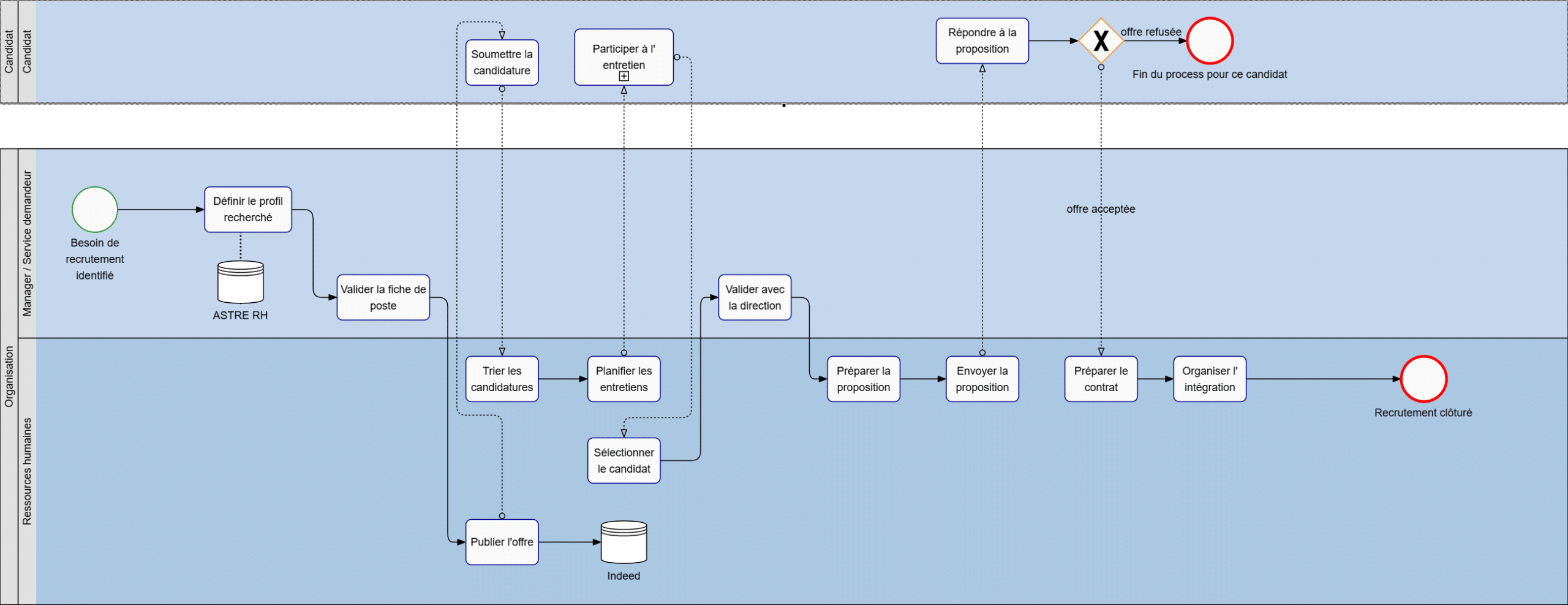
BPMN mapping example of the recruitment process, illustrating the interactions between departments and HR tools.
Example 2: Customer Order Processing
Under a simple scheme (order → preparation → delivery), mapping reveals:
- Interactions between e-commerce site, CRM, ERP, and invoicing
- Dependencies between applications
- Risks in case of a failure of a component
With myCarto, these elements are interconnected.
Each process is linked to data, applications, and technical components, enabling immediate impact analysis in case of changes or incidents.
How to Successfully Map Your Processes
Successful process mapping relies on a few simple principles:
- Identify key processes: those with high impact on performance or compliance.
- Define actors and flows: who is involved, when, and via which tool.
- Model using a recognized method, such as BPMN, to ensure readability and sustainability.
- Connect processes to the rest of the IS: applications, data, infrastructure.
- Keep the mapping alive: update it with each evolution.
With myCarto, these steps are integrated into a collaborative environment. Process modeling becomes a living tool, connected to the IS, always up-to-date, and immediately usable for audits or transformation projects.
Who Are the Actors in Process Mapping?
Process mapping is not just a technical exercise; it is a collective endeavor. It involves different roles, each extracting real value:
Business Owners set the direction. They translate strategic objectives into clear, measurable operational processes.
Process Owners orchestrate modeling. They ensure coherence, clarity, and continuous updating of processes.
Project Managers rely on mapping to anticipate impacts, define requirements, and track dependencies across departments.
Functional and Enterprise Architects link processes to applications, data, and infrastructure, turning mapping into a true IT governance tool.
IT Department gains a transversal view of the information system, understanding how tools support operations and managing changes confidently.
Auditors and Quality Managers use mapping to verify compliance, traceability, and flow consistency.
Support and Operations Teams leverage mappings to quickly diagnose incidents and maintain service continuity.
In short, process mapping brings together all actors around a shared understanding of how the company operates, creating a common language between business and IT.
Why Choose myCarto for Your Process Mapping?
Unlike traditional process modeling tools, myCarto is integrated into the enterprise IS global repository.
Each process is linked to the different layers of enterprise architecture – business, functional, application, and technical – providing a complete and contextualized view of IT system interactions.
Key Benefits :
- Multidimensional Vision: model processes and their real dependencies in an environment connected to applications, data, and infrastructure.
- Collaborative Approach: business and IT work on a common shared base.
- Impact Simulation: identify in one click which processes, activities, and actors are directly or indirectly affected by a change.
For example, you can simulate the business impact of a server outage: if a machine fails, myCarto immediately shows the affected processes, activities, and actors, allowing you to anticipate operational consequences. - Interoperability: compliant with standards (BPMN, ArchiMate, CIGREF).
With myCarto, process mapping goes beyond documentation: it becomes a strategic governance and management tool, supporting performance and risk control.
Ready to Turn Your Process Maps into a True IT Governance Tool?
Conclusion
Today, process mapping is essential for understanding, controlling, and transforming an organization.
To be useful and alive, it must be part of an integrated and collaborative approach.
👉 This is exactly myCarto’s promise: a process mapping software that connects your BPMN models to your entire information system.
Ready to turn your process maps into an IT governance lever?
➡️ Request a myCarto demo and discover how to make your processes visible, manageable, and truly alive.